Run Every Exam
With Confidence
Exam timer software that keeps every display in sync, instantly - no 15-20 second lag. Extra time at 10%, 25%, or 50% and rest breaks, per student. Built for GCSE, A-Level, IB, and AP exams.
Free plan runs one exam session at a time · Pro $89/year
A real display, running now - open it, no sign-up needed.
Built for Exam Day
Clocks that can't freeze
Timers are calculated from timestamps, not ticking counters. If the connection drops mid-exam, every clock keeps running - and stays right.
Recovers on its own
Displays reconnect and pick the exam back up automatically when the network returns. No refresh, no restart.
Nothing to install
TVs, projectors, tablets, phones - if it can open a link, it can run an exam. No apps, no IT tickets.
Instant everywhere
Change anything on one device and every display follows immediately. One invigilator can run the whole hall.
How It Works
Get your exam displays running in under 2 minutes. No training required.
Create Your Exam Session
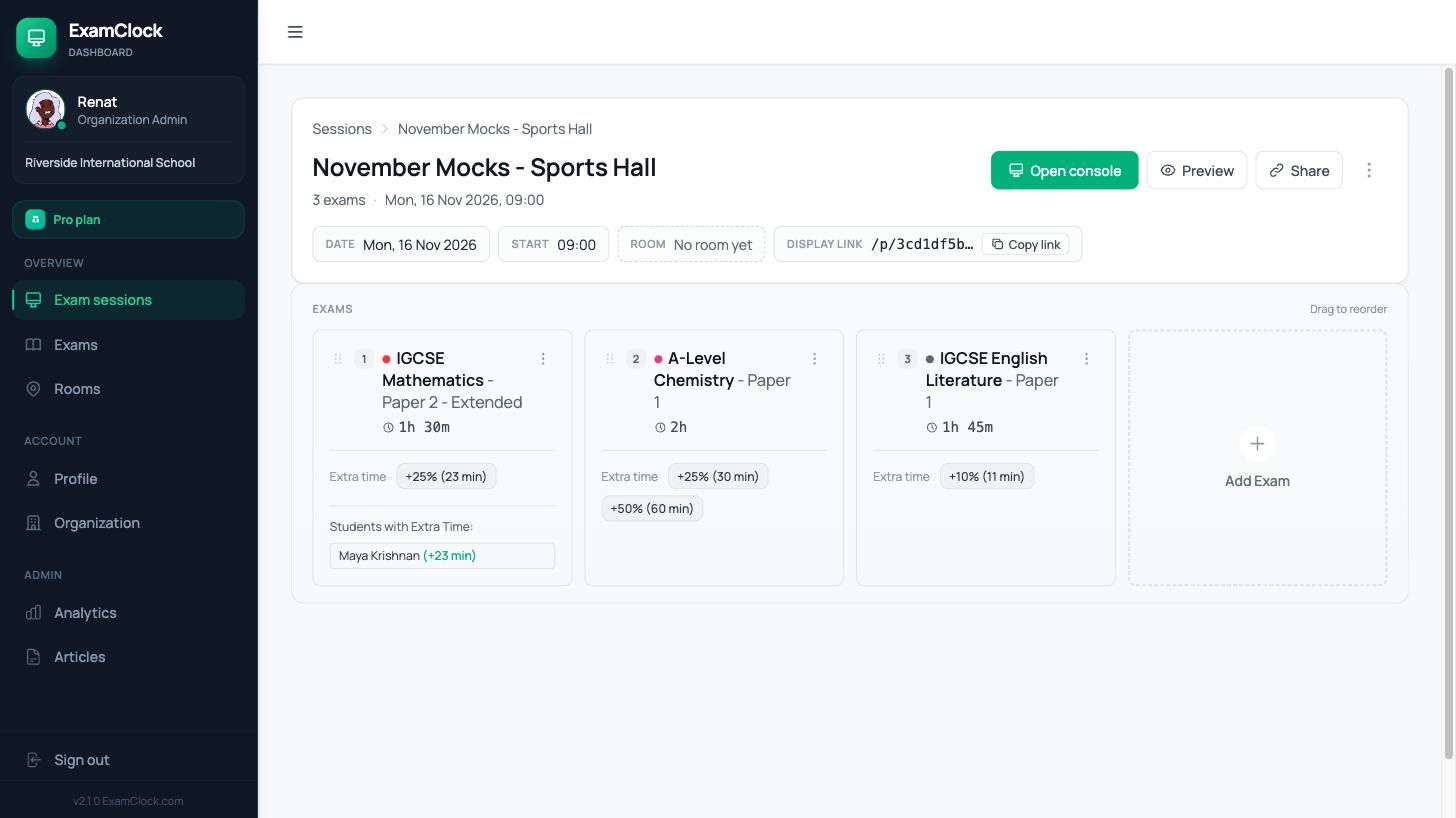
Enter your exam details - name, duration, and start time. Add students with extra time accommodations if needed. Everything is saved automatically.
- Choose from 1,600+ exam templates
- Set individual extra time percentages
- Schedule exams in advance
Open Display on Any Screen
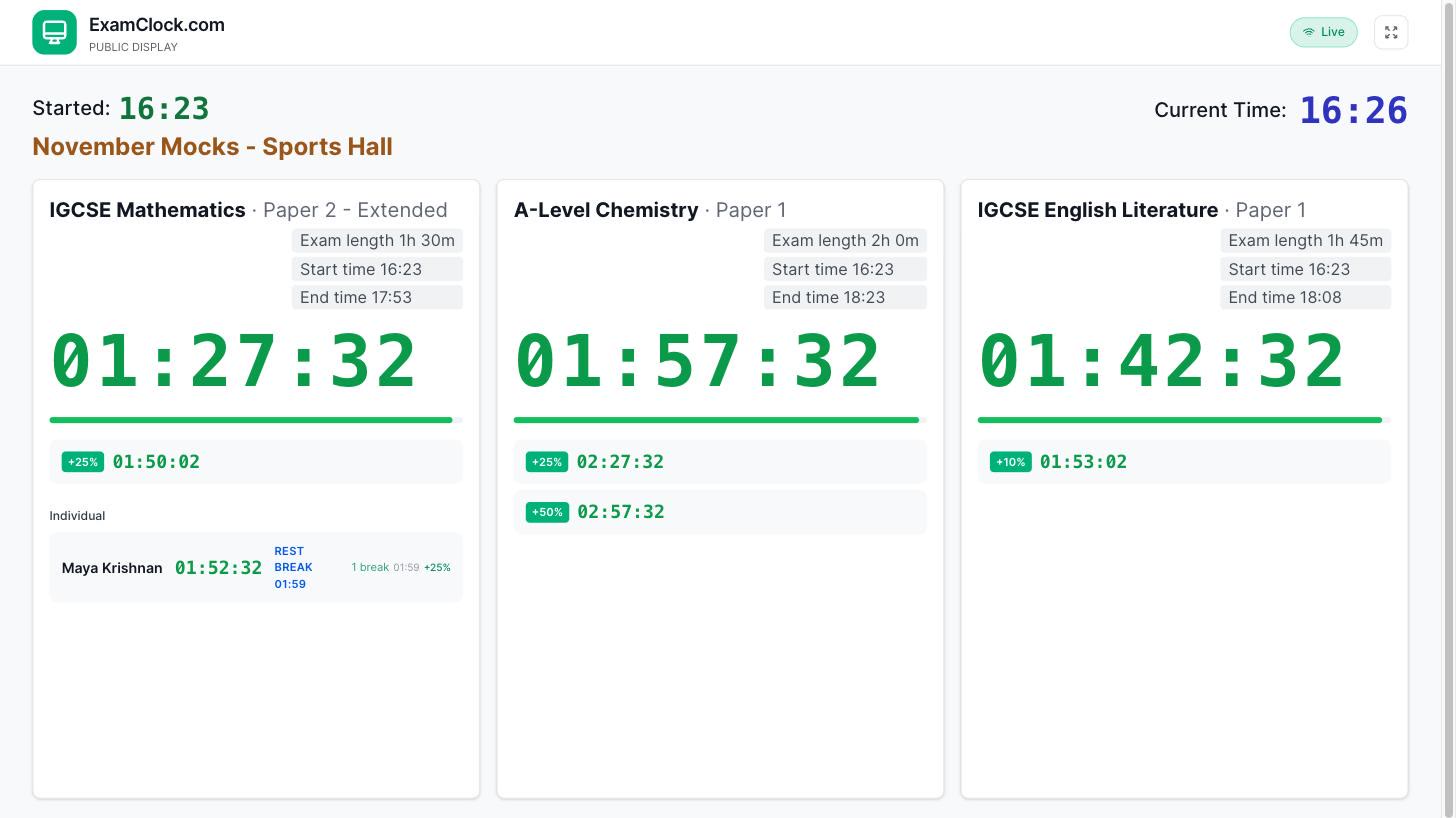
Share the display link or scan a QR code to open the timer on any device - TVs, projectors, tablets, or phones. No app installation needed.
- Works on any device with a browser
- Multiple displays per session
- High-contrast mode for visibility
Control Everything in Real-Time
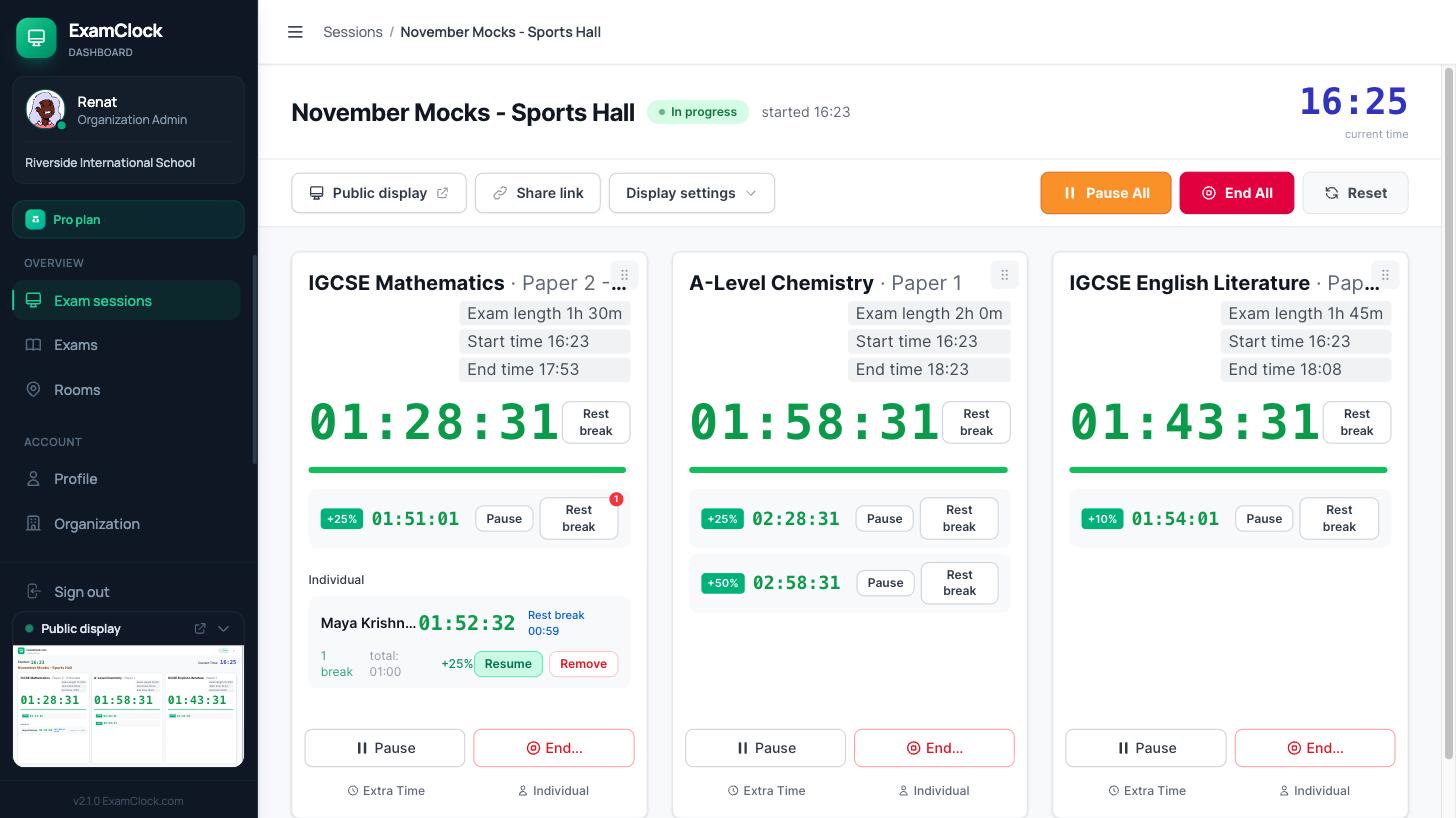
Start, pause, or adjust timers from your phone or laptop. Changes sync instantly across all connected displays - no refresh needed.
- Add students mid-exam
- Pause individual timers for rest breaks
- End early or add time with one tap
Ready to run your first exam?
Who It's For
Built for the people who actually run exam day.
Exams officers
Build the whole season from 1,600+ board templates or an official schedule, then hand invigilators a link - not a training session.
SENCOs & access coordinators
Set 10%, 25%, or 50% extra time per student once; every display shows each student's own clock and logs their rest breaks.
Invigilators
Start, pause, and end from a phone at the back of the hall. A late starter or mid-exam change never touches anyone else's clock.
IB coordinators
Import the official November 2026 schedule in one click, run mocks exactly like the real sitting, archive every session.
What It Does on Exam Day
Multi-exam displays, per-student arrangements, and sync you never have to think about.
Multi-Exam Timer Display
Run up to 12 simultaneous exams on one screen with individual timers and controls. Perfect for large exam halls running multiple papers.
Instant Cross-Device Sync
Changes appear instantly on all screens - no 15-20 second delays. Update one device, all displays sync immediately.
WCAG AA Compliant
High contrast, dark mode, and screen reader support for accessibility. Meets international standards for educational software.
True Offline Capability
Exams continue running even when internet is lost. All devices stay synchronized without network connection.
Mid-Exam Flexibility
Add or remove students, change extra time percentages, handle late starters - all while exams are running. No need to restart sessions.
Individual Rest Breaks
Built-in support for students with rest break accommodations. Pause individual timers while keeping the main clock running.
Set Up for Whatever You're Running
Official schedules, ready-made templates, and per-student arrangements for every exam season on your calendar.
IB Diploma
IB-ready timers plus the official November 2026 schedule.
IGCSE
The full Edexcel IGCSE exam schedule with every paper's timing.
International A-Level
Every Edexcel IAL paper, with dates and durations.
KS2 SATs
SATs week, timed to the minute.
Mock exams
Run mocks exactly like the real thing.
Extra time & access
10%, 25%, 50% and rest breaks - handled per student.
AQA, OCR, Cambridge & more
Templates for 10 major exam boards.
Every template
Browse all 1,600+ ready-made exam templates.
Four Ways to Time an Exam Hall
Schools and universities usually pick one of these. Three fall apart the moment one candidate has extra time - here's the honest comparison.
Whiteboard + wall clock
GoodFree, familiar, and it can't crash.
Trade-offsOne time for the whole room - extra-time candidates get hand-done arithmetic on the board, every change means rewriting it mid-exam, and nothing is logged.
PowerPoint countdown slides
GoodTools every staff room already has, and it looks tidy on a projector.
Trade-offsOne timer per deck, so extra time means separate laptops. Editing mid-exam stops the show, and a sleeping laptop freezes the clock.
Generic online timers
GoodOne click and a countdown is on the screen.
Trade-offsA single countdown with no exam details, no per-candidate clocks, and no sync - each screen is set by hand and drifts on its own.
ExamClock
GoodEvery candidate's clock calculated for them - 10%, 25%, or 50% extra time and rest breaks - on displays that stay in sync and survive wifi drops.
Trade-offsThe hall screen needs a browser and a link. The free plan runs one exam session at a time - Pro is $89/year.
Already using a dedicated exam display tool? Compare side by side →
Import the official
exam schedule
124 papers across 15 exam days. Select your zone, pick your subjects, create every session with one click.
Questions Coordinators Actually Ask
All of them have the same answer: yes.
Can I add a student after the exam has started?
Yes. Add, edit, or remove students mid-exam - every display updates the moment you save. Mid-exam changes →
Can I change extra time from 25% to 50% mid-exam?
Yes. Adjust one student's arrangement without restarting the session or touching anyone else's clock.
Can one student take a rest break while the others keep going?
Yes. Pause that student's clock and resume it when they're back - every break is logged. Rest breaks →
Will the clocks survive the wifi dropping?
Yes. Timers are calculated from timestamps, not counters - a lost connection can't freeze or drift a running exam. Offline support →
Do changes really reach every screen instantly?
Yes. Displays sync in real time - no 15-20 second delays, no manual refresh. Real-time sync →
Can I run several papers on one screen?
Yes. Up to 12 exams side by side, each with its own clock, extra-time rows, and end time. Multi-exam display →
Can invigilators run it without training or an app?
Yes. If they can open a link, they can run an exam - nothing to install, nothing to configure.
Can I see the price without talking to sales?
Yes. Pricing is public - plans from $89/year, with a free plan to start. Pricing →
Start free. Run your first exam today.
The free plan runs one exam session at a time - extra time and rest breaks included. No card required.
Whole exam team on board? Pro is $89/year - unlimited sessions, unlimited invigilators, 1,600+ templates.